From Static Data to Instant Follow-Up: Evolving Your Trusted Spreadsheets with Practical AI
It’s impossible to open a browser today without being buried under headlines claiming AI will ‘change everything.’ At EXRM, we understand that for most teams, that ‘everything’ feels overwhelming. While AI is certainly reshaping the business landscape, the gap between theory and reality often feels too wide. We believe the best way to prepare for a future leap is by solving the headaches of today. You don’t need to overhaul your entire operation overnight; you just need smarter ways to handle the ‘ground-level’ tasks that drain your calendar. By automating the routine now, you clear the headspace to eventually reinvent the big picture. We’re here to help you build that practical bridge—starting with your next spreadsheet.
While the world focuses on the AI ‘noise,’ we remain grounded in our core mission: making your spreadsheets work harder. We aren’t adding AI for the sake of it; we are identifying specific, high-impact ways to layer it into your existing workflows—applying it only where it adds clear value and keeps your systems simple
The Demo: From Customer Feedback to Personalized Reply in Seconds
**– insert demo video here–**
We’re launching a collection of demos to show you samples of where AI makes sense in your daily operations. We’re starting with a common headache: customer feedback. Here’s a look at our first simple, high-impact workflow that handles the heavy lifting for you:
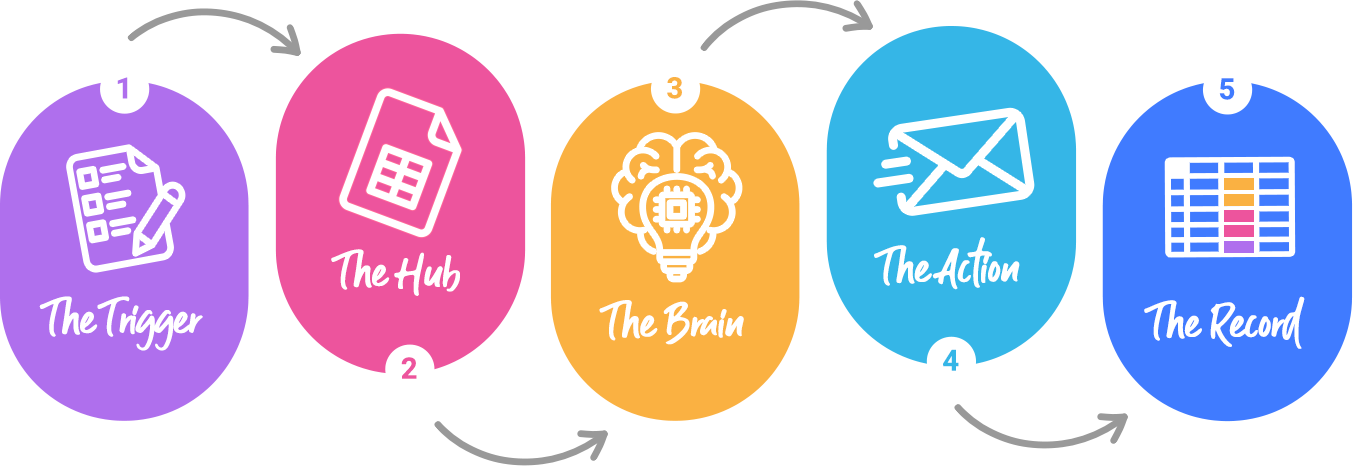
- The Trigger: A customer fills out a Google Form with their name, email, satisfaction score, and a comment about their experience.
- The Hub: The data is instantly pulled into a Google Sheet (the engine you already know and trust).
- The Brain: An Apps Script sends the open-ended comment to Gemini*. Instead of a generic template, Gemini drafts a unique, context-aware reply based on the customer’s specific praise or concern.
- The Action: The reply is automatically sent via Gmail.
- The Record: The spreadsheet updates itself, logging the response text, the timestamp, and switching the status to “Sent”.
The result? Your customer feels heard instantly, and your team never has to copy-paste a “Thank you for your feedback” email ever again.
Unlocking More Value from the Tools You Already Own
The real advantage here is that there’s no new software to buy and no steep learning curve to climb. We leverage the Google Workspace you already pay for, keeping costs at a minimum while radically freeing up your team. Instead of spending hours drafting repetitive emails, your employees can focus on the feedback itself—analyzing why customers are frustrated and focusing on refining the unique value propositions that keep your customers coming back
- No New Software: It lives inside Google Workspace.
- Focused Automation: We use AI for what it does best—for example, interpreting and drafting text—while keeping your data workflows powered by the stable, “terrestrial” logic that spreadsheets have mastered over decades.
- Time Reclaimed: If you receive 50 pieces of feedback a week, this automation saves you roughly 4–5 hours of manual drafting.
- Happier Clients: Your customers feel seen and heard instantly, turning feedback into a moment of connection.
Where Else Can This Logic Apply?
This “Form → Spreadsheet → AI → Action” workflow is a powerhouse for several repetitive business tasks:
Job Applications: Automatically screen resumes submitted via forms and send personalized “Next Steps” or “Keep on File” emails.
Inbound Sales Inquiries: Read a “Contact Us” message, categorize the lead’s intent, and send a relevant brochure or booking link.
Event Registrations: Send personalized prep-material based on a guest’s specific dietary requirements or session interests.
At the end of the day, AI shouldn’t be a mystery that complicates your workflow—it should be a tool that simplifies your life. By delegating the repetitive drafting and data entry to a smart, spreadsheet-based system, you aren’t just being more efficient; you are making a strategic choice to invest your team’s energy where it matters most. When your people are free to think, innovate, and connect with your customers, your business is no longer just “keeping up”—it’s leading.
Ready to build your bridge to a smarter workflow?
If you’re ready to see how you can empower your existing spreadsheets to do the heavy lifting for you, we’re here to help.
*Gemini was selected because our internal testing (and use) showed it to be the best tool for drafting social media content. Additionally, as a Google-based AI, it offers seamless integration with our existing environment.